Classification Researcher AI HTS classification software

Classify the SKU nobody wants to touch.

Ginger reads the spec sheet, asks what it leaves out, and hands you the code with the reasoning on paper. For the U.S. and Canada, and the EU in beta.

Classification Researcher
USCAEUBetaReport
Selected HTS code8518.30.2000HTS rateFreeHeadphones and earphones, whether or not combined with a microphone: Other
Could also be…
8517.62.0090FreeMachines for the reception and transmission of voice or data
8504.40.9580FreeStatic converters: Other
Classification progress4 / 4
  1. 1Heading4 digits
  2. 2Subheading6 digits
  3. 3Subheading8 digits
  4. 4HTS code10 digits

Illustration with a sample product: the Classification Researcher window for wireless Bluetooth earbuds with a USB-C charging case shows the selected HTS code 8518.30.2000, rate Free, two codes it could also be and all four levels complete. A market switch above it is set to US, with CA and EU Beta beside it.

What is the Classification Researcher?

The short answer first.

CH01Classification Researcher

The Classification Researcher is GingerControl's AI tool for classifying U.S. and Canadian imports, with the EU in beta. U.S. codes follow the Harmonized Tariff Schedule, the official list of classification codes and duty rates for goods entering U.S. commerce. From a description or spec sheet, Ginger applies the General Rules of Interpretation, six sequential rules that govern how goods are classified, from 4-digit heading to 10-digit code, and asks a multiple-choice question when one missing fact decides the code. It checks CBP CROSS rulings first on U.S. codes and writes a PDF report for a licensed customs broker to review.

Made for
Classification owners, customs brokers and 3PL clearance teams
You give it
A description, a spec sheet, photos or a spreadsheet
You get back
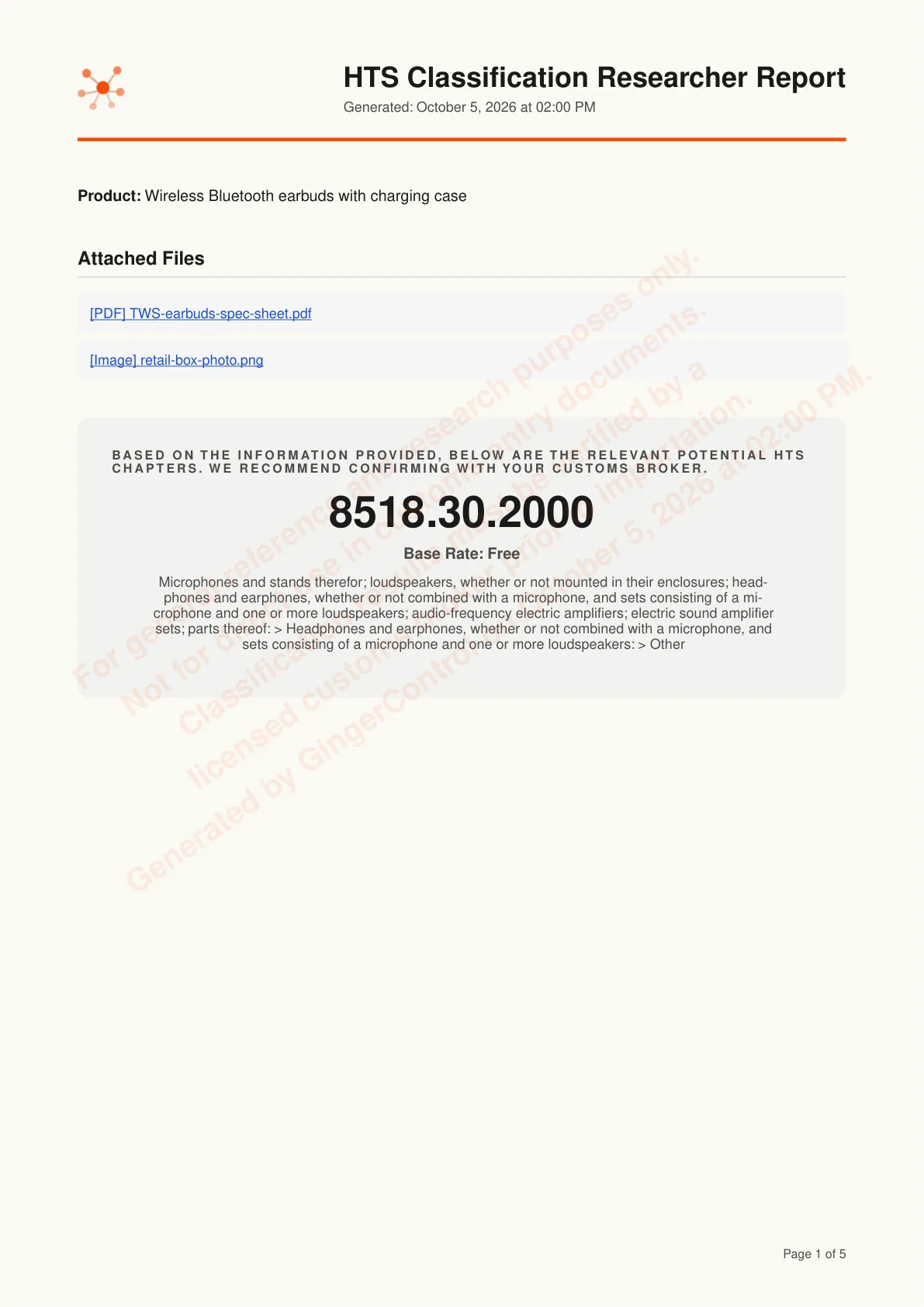
A 10-digit code for the U.S. or Canada (an 8-digit CN code in the EU beta), the reasoning and a PDF report

How does it reach a 10-digit code?

Three steps. You only answer what the documents can't.

  1. Tell Ginger about the product.

    Pick the U.S., Canada or the EU (beta), then type a description or attach the spec sheet. A spec sheet beats typing.

    Illustration with a sample product: the Tell Ginger about your product box holds a typed description of wireless Bluetooth earbuds with a USB-C charging case and an attached spec sheet PDF. Below it are Attach docs, a Destination menu open with United States selected, Canada, and European Union marked Beta, and Start Classification.

  2. Answer what only you know.

    When one fact decides the code, Ginger asks it as a multiple-choice question. Nothing else.

    Illustration with a sample product: Ginger asks one multiple-choice question, What do buyers mainly use it for?, with three options, Listening to music and taking calls selected, and a Submit answers button. Beside it, a banner says the classification is still in progress, with 2 of 4 levels done.

  3. Get the code and the reasons.

    The 10-digit code, the codes it ruled out, and a report you can keep for the five years customs asks.

    Illustration with a sample product: after the answer, the result shows the selected HTS code 8518.30.2000 with an HTS rate of Free, two codes it could also be, and all 4 levels of the classification progress done, under a US, CA and EU Beta market switch set to US and a Report button.

Classification Researcher
Tell Ginger about your productRequired

Wireless Bluetooth earbuds with silicone tips and a USB-C charging case.

TWS-earbuds-spec-sheet.pdf
Attach docsUnited StatesDestinationUnited StatesCanadaEuropean UnionBetaStart Classification

A spec sheet beats typing.

  1. Tell Ginger about the product.

    Pick the U.S., Canada or the EU (beta), then type a description or attach the spec sheet. A spec sheet beats typing.

    Classification Researcher
    Tell Ginger about your productRequired

    Wireless Bluetooth earbuds with silicone tips and a USB-C charging case.

    TWS-earbuds-spec-sheet.pdf
    Attach docsUnited StatesDestinationUnited StatesCanadaEuropean UnionBetaStart Classification

    A spec sheet beats typing.

    Illustration with a sample product: the Tell Ginger about your product box holds a typed description of wireless Bluetooth earbuds with a USB-C charging case and an attached spec sheet PDF. Below it are Attach docs, a Destination menu open with United States selected, Canada, and European Union marked Beta, and Start Classification.

  2. Answer what only you know.

    When one fact decides the code, Ginger asks it as a multiple-choice question. Nothing else.

    Classification Researcher
    Please answer the following questions1 question

    What do buyers mainly use it for?

    The set splits by what gives it its essential character.

    • Listening to music and taking callsThe case only charges the earbuds
    • Hearing assistanceAmplifies sound for the wearer
    • OtherEnter your own answer or upload a file
    Submit answers

    Classification is still in progress.

    Classification progress2 / 4
    1. 1Heading4 digits
    2. 2Subheading6 digits
    3. 3Subheading8 digits
    4. 4HTS code10 digits

    Illustration with a sample product: Ginger asks one multiple-choice question, What do buyers mainly use it for?, with three options, Listening to music and taking calls selected, and a Submit answers button. Beside it, a banner says the classification is still in progress, with 2 of 4 levels done.

  3. Get the code and the reasons.

    The 10-digit code, the codes it ruled out, and a report you can keep for the five years customs asks.

    Classification Researcher
    USCAEUBetaReport
    Selected HTS code8518.30.2000HTS rateFreeHeadphones and earphones, whether or not combined with a microphone: Other
    Could also be…
    8517.62.0090FreeMachines for the reception and transmission of voice or data
    8504.40.9580FreeStatic converters: Other
    Classification progress4 / 4
    1. 1Heading4 digits
    2. 2Subheading6 digits
    3. 3Subheading8 digits
    4. 4HTS code10 digits

    Illustration with a sample product: after the answer, the result shows the selected HTS code 8518.30.2000 with an HTS rate of Free, two codes it could also be, and all 4 levels of the classification progress done, under a US, CA and EU Beta market switch set to US and a Report button.

Can you see why it picked this code?

Every round of the GRI is on the page, including the headings it set aside.

Model reasoning process8518.30.2000

Round 1Determining 4-digit heading: 8518

GRI 1Consider

Three headings each describe part of this retail set. No single one covers the earbuds and the case together.

CandidateWhat the heading coversStatus
8518Headphones and earphonesKept
8517Voice or data over a wireless networkConsidered
8504Static converters (the charging case)Considered

GRI 3(b)Matched

Put up together for one need, personal listening. The case only stores and recharges the earbuds, so the earbuds give the set its essential character.

Round 2Determining 6-digit subheading: 8518.30

GRI 6Matched

Headphones and earphones, whether or not combined with a microphone.

Round 3Determining 8-digit subheading: 8518.30.20

GRI 6Matched

8518.30.10 is for line telephone handsets. These pair over Bluetooth, so: Other.

Round 4Determining 10-digit HTS code: 8518.30.2000

GRI 6Resolved

A single statistical line. Final code 8518.30.2000.

Illustration with a sample product: a Model reasoning process window works through four rounds for the earbuds set. In Round 1, GRI 1 and GRI 3(b) keep 8518 over 8517 and 8504; Rounds 2 to 4 apply GRI 6 to reach 8518.30.2000.

What does it look like in the app?

Real screens from the app, run on a sample product.

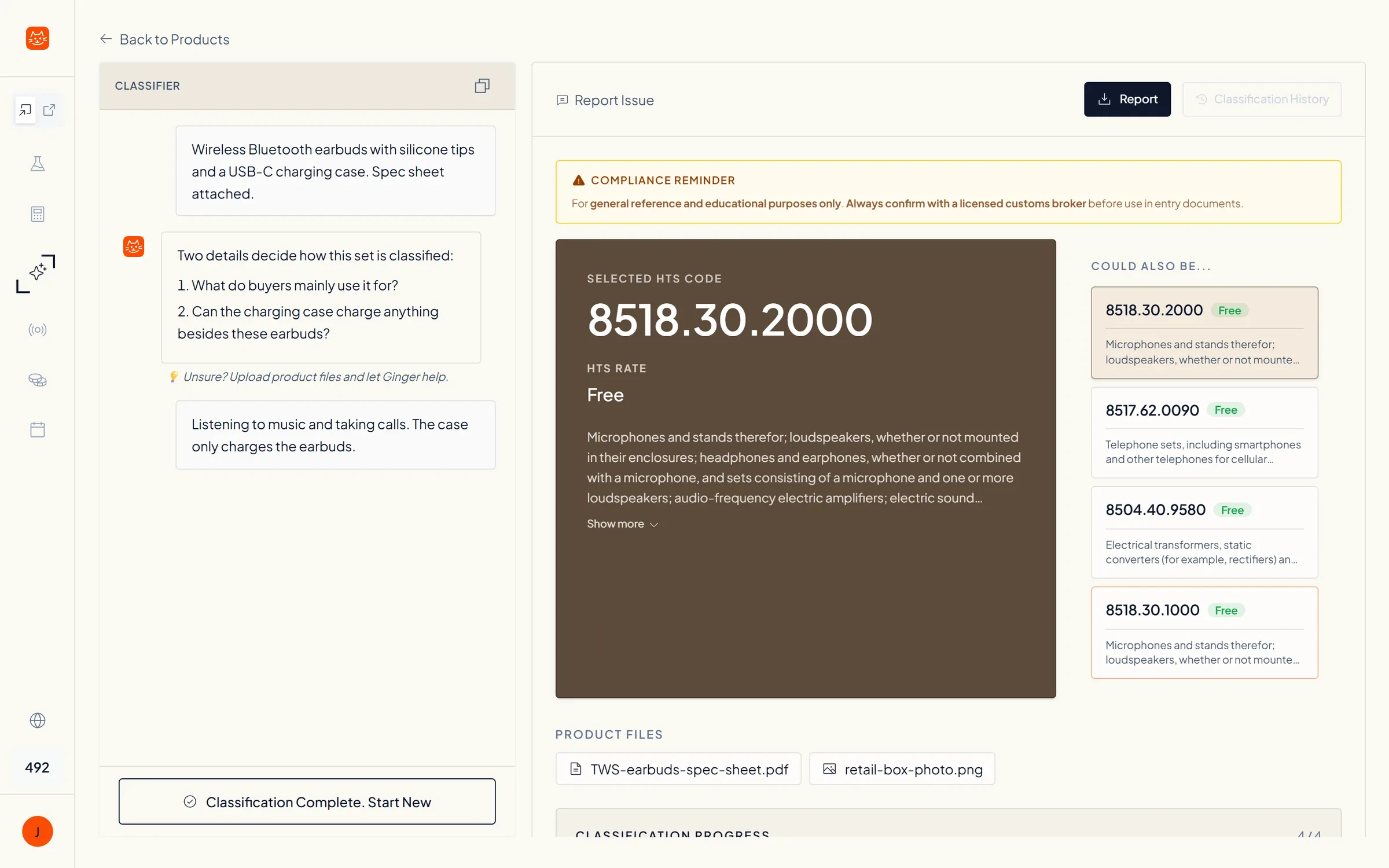
The Classification Researcher result: the selected code 8518.30.2000, its rate, and the codes it could also be, next to the chat where Ginger asked one question

The result, with the codes it could also be

The 10-digit code and its rate up top, with the other codes Ginger weighed listed beside it.

What do customs brokers say about it?

That it shows its work on every call, so a broker can stand behind the code.

Portrait of Dorée ConleyDorée Conley, LCB Customer Licensed Customs Broker 5 out of 5 stars

It asks before it guesses, and every code comes with its reasoning.

As a broker I classify against deadlines, across dozens of markets, with the tariff rules changing mid-year. Most tools hand back a code and leave me to work out why.

The Classification Researcher asks for the product facts it is missing before it suggests a code, then lays out the GRI reasoning behind the 10-digit result. When a client or CBP asks why, the answer is already on paper.

Portrait of Michael WeickMichael Weick, LCB / CCS GingerControl advisor Retired Customs Compliance Manager, formerly at Subaru of America

No compliance team on earth reviews 100% of its entries. This does.

For the years I ran customs compliance, post-entry review meant sampling: pull a slice of entries, hope it is representative, and accept that whatever falls outside it stays invisible.

GingerControl re-reasons the classification and valuation call on every single entry, the way a human reviewer would, and shows its work. It is not an audit of your people, it is the second reader every trade team has been missing.

Questions about the Classification Researcher

How is an HTS classification researcher different from a lookup tool?

A lookup tool returns a code. The Classification Researcher returns the research behind one: it follows the General Rules of Interpretation in order, detects when a product needs the GRI 3(b) essential-character test, and writes the full reasoning chain into a report. The output is research for a licensed customs broker to review, not a filing decision.

How do I find the HTS code for my product?

Start from what the product is made of, what it does and how it is used, then work down the Harmonized Tariff Schedule by the General Rules of Interpretation: heading first, then subheading, checking the Section and Chapter Notes and CBP rulings on similar goods. The Classification Researcher does that research from your spec sheet and writes it up. For an answer CBP is bound by, request a ruling under 19 CFR Part 177.

Which countries does it classify for?

Three markets. The United States and Canada get the full 10-digit code, and the European Union is in beta with an 8-digit code from the Combined Nomenclature (CN), shared by all 27 member states. You pick the market for each product under Destination before you start. Parts Library and Compliance Radar cover U.S. products only.

Can it find the 10-digit tariff classification number for Canada?

Yes. Pick Canada under Destination, and Ginger returns the full 10-digit classification number from Canada's Customs Tariff: the 6-digit HS subheading, a 2-digit tariff item set by Finance Canada, and a 2-digit statistical suffix for Statistics Canada (CBSA). You get the reasoning behind it the same way as for a U.S. code, and your customs broker reviews it before it goes on a declaration.

How long does a CBP binding ruling take, and how do I request one?

Request it online through eRulings: describe the product and the transaction, up to five items of the same kind per request (19 CFR Part 177). CBP says its New York ruling office generally issues rulings within 30 calendar days, and requests referred to headquarters within 90 days (CBP eRulings). A ruling binds CBP on the transactions it describes as long as the facts you gave are accurate, so it is worth it for codes with real duty at stake.

Can it turn a bill of materials into HTS codes?

Yes, in GingerOS. Upload your BOMs and GingerOS links the products in your database to each other, so you can see both ways: what each part goes into and what each product is made from. When it classifies a product, it reads the BOM to weigh which component gives the whole its essential character. BOM upload and batch classification are for GingerOS customers, not the GingerLite app.

Can it check the HTS codes we already use?

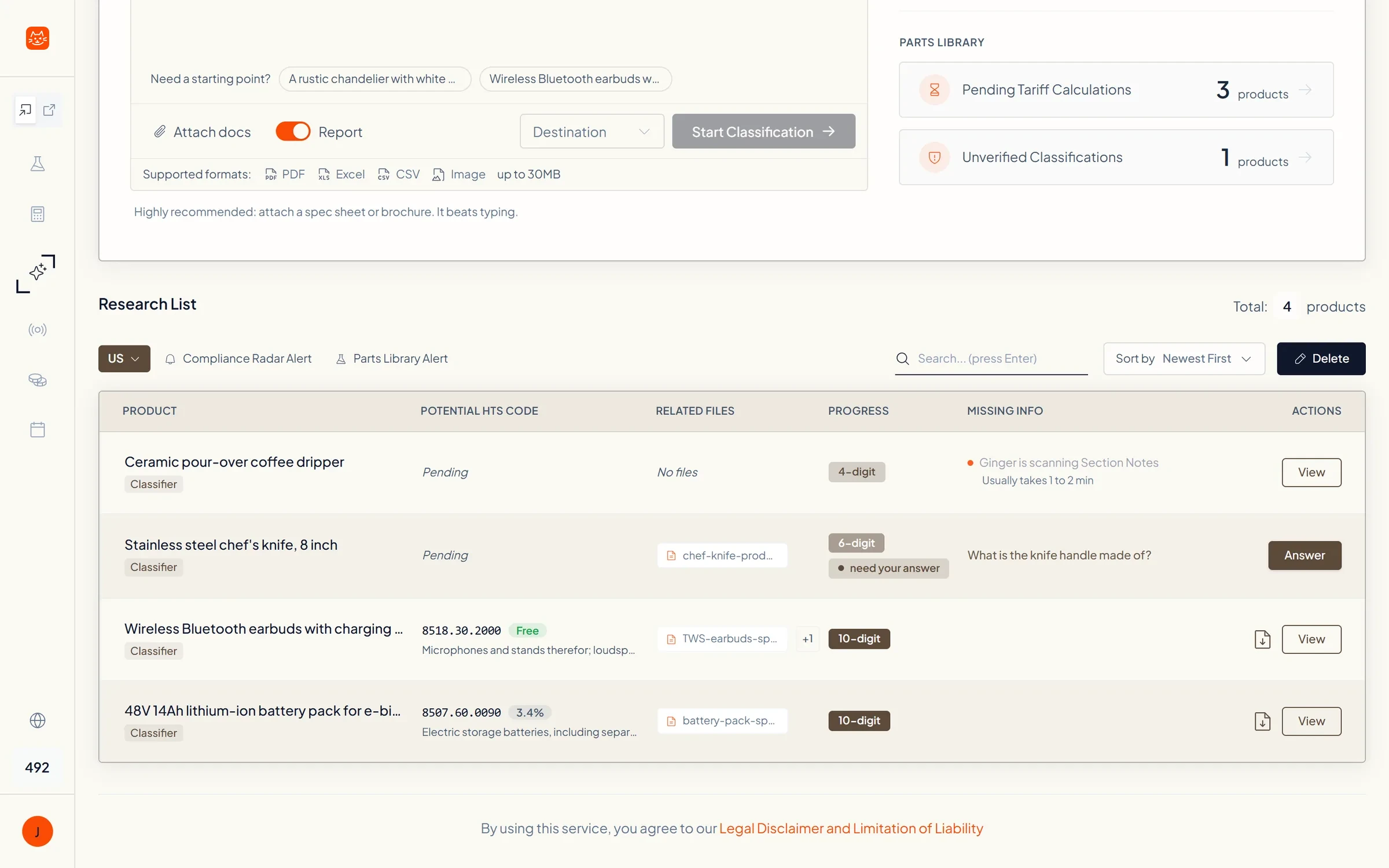
Yes. In the GingerLite app, import your products with their current codes into the Parts Library and re-audit them one at a time in the Classification Researcher: each comes back with its reasoning next to the code on file, and the ones that differ are the ones to review with your broker. Rechecking a whole catalog in one run, and again whenever a rule changes, is part of GingerOS.

How does it handle composite goods and sets under GRI 3(b)?

When GRI 1 through 3(a) cannot settle a product on one heading, GRI 3(b) asks which part gives the whole its essential character. The classifier detects that trigger on its own, weighs the role, value and use of each part, and shows the result as its own step in the reasoning, so a broker can see why the set landed where it did.

When does it use CBP CROSS rulings?

Before it decides. It reads rulings on comparable products first and reasons through the GRI with them in hand, the way a broker works, instead of picking a code and attaching rulings that seem to agree afterwards.

Why does it ask me questions?

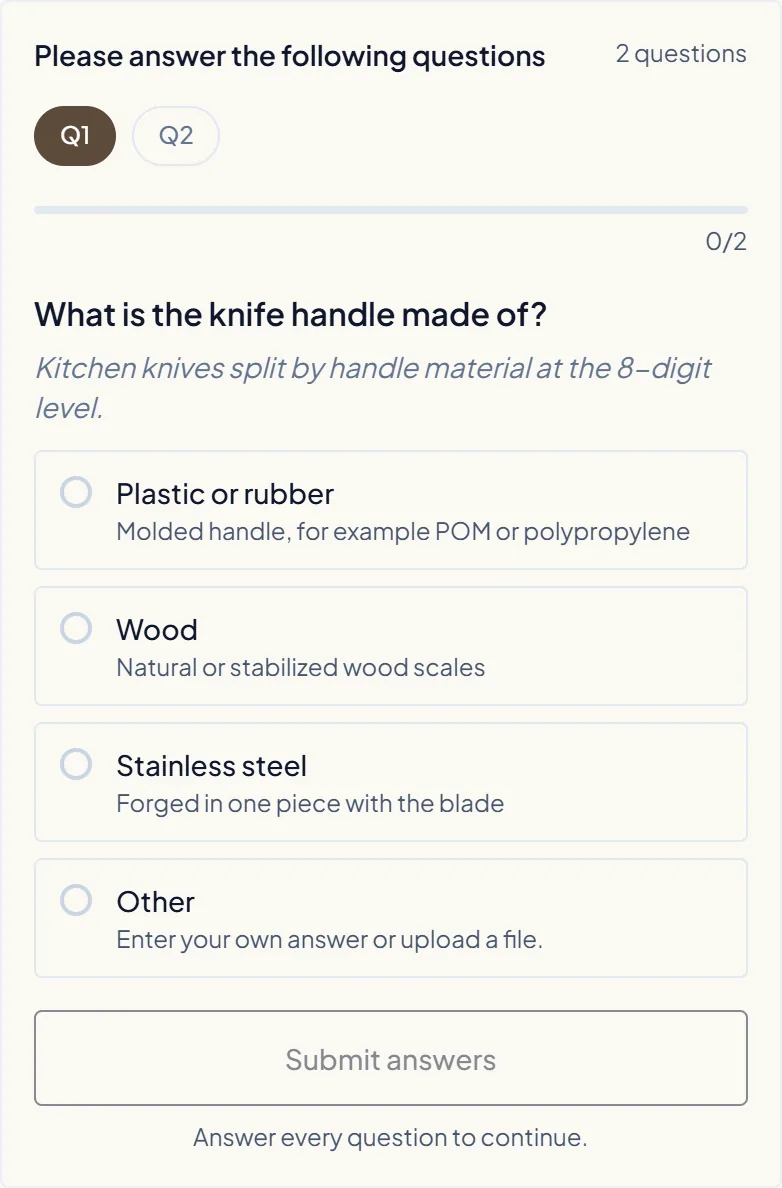
Because some codes turn on a fact the documents do not state, like what a handle is made of or what buyers mainly use a product for. When that happens Ginger asks one multiple-choice question about that fact and nothing else. If your spec sheet answers it, you will not be asked.

What can I give it?

A written description, or files: PDF spec sheets and brochures, Excel or CSV sheets, and product photos, up to 30 MB. A spec sheet usually beats typing, because it answers questions before Ginger has to ask them.

How does it help when CBP sends a CF-28 about an old classification?

Each run keeps the reasoning chain, the questions and answers, and the rulings consulted, so you can show why a code was chosen instead of rebuilding it from memory. Importers keep classification records for five years under 19 CFR 163.4. Your licensed customs broker leads the CF-28 response itself.

Can I put the result straight on a customs entry?

No. Per CBP ruling HQ H290535, classifying specific goods beyond six digits for importation is customs business under 19 U.S.C. § 1641, which needs a licensed customs broker. GingerControl is not a broker. The report is research your broker reviews before it goes into entry documents, and the same goes for a Canadian or EU code before it goes on a declaration.

Want an AI system that fits your process?

See GingerOS.

GingerOS is the trade compliance system we build on your own process: every code keeps its reason, and every change in your company triggers its own compliance recheck (tariffs, classification, export controls and more).

Click Me!

See how GingerOS works