Export Control Classifier ECCN classification software

Find the ECCN hiding in your datasheet.

Ginger reads the specs, narrows the Commerce Control List from category to entry, and hands you the code with every ruled-out candidate on paper.

ECCN Classification
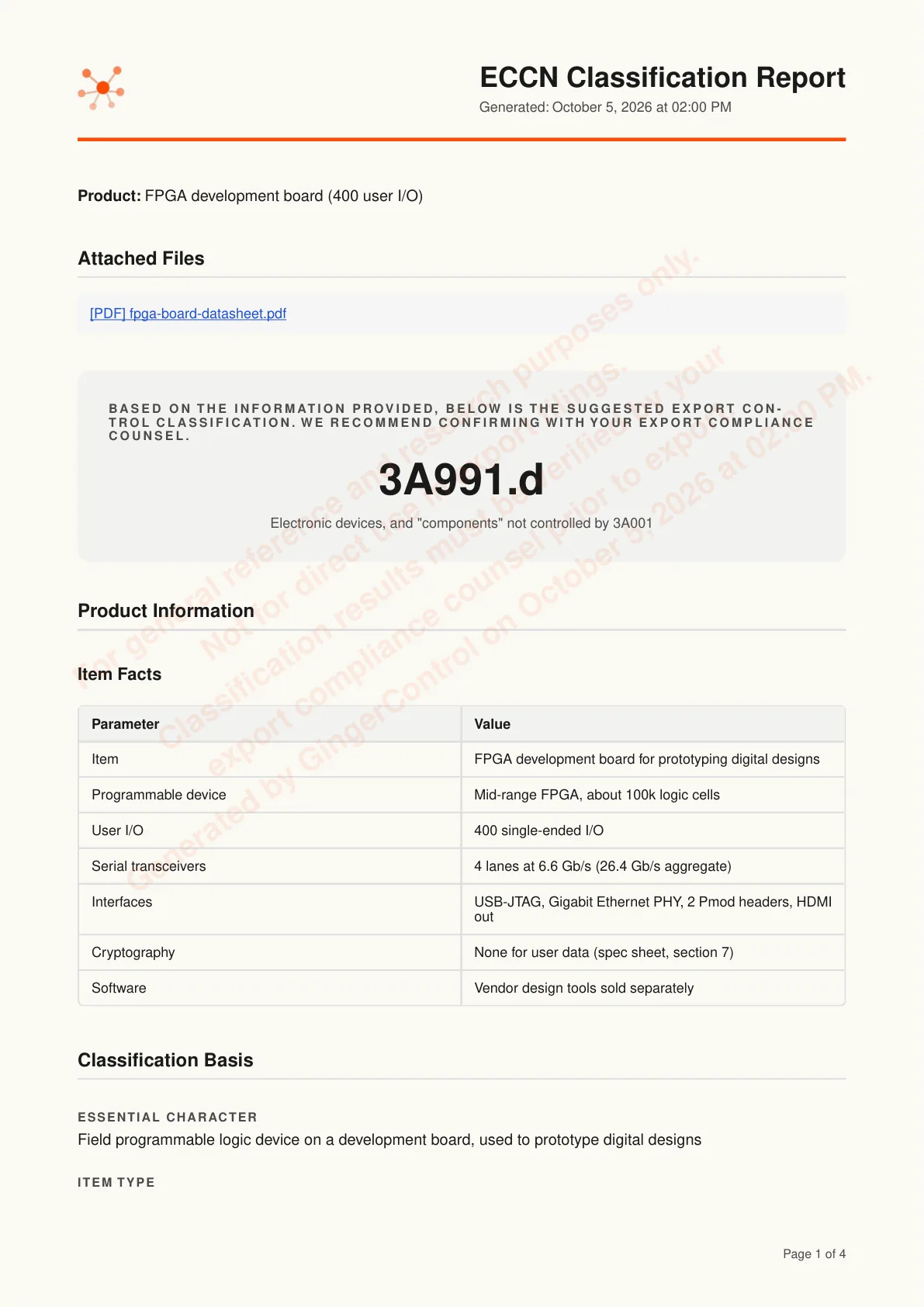
Suggested ECCN3A991.dElectronic devices, and “components” not controlled by 3A001
Classification completefpga-board-datasheet.pdfReport
Item Facts
ParameterValue
ItemFPGA development board
User I/O400 single-ended I/O
Serial transceivers4 lanes at 6.6 Gb/s
CryptographyNone for user data

Illustration with a sample item: the ECCN Classification window shows a complete result for an FPGA development board, suggested ECCN 3A991.d, with the attached datasheet and a Report button. An Item Facts table below lists 400 single-ended I/O, 4 serial transceiver lanes at 6.6 Gb/s and no cryptography for user data.

What is the Export Control Classifier?

The short answer first.

CH02Export Control Classifier

The Export Control Classifier is GingerControl's AI researcher for U.S. export classification under the EAR. Describe an item and attach its spec sheet, datasheet or firmware documentation. Ginger pulls out the control parameters, searches Categories 0 to 9 and narrows from category to product group to the item's ECCN, a five-character alphanumeric code on the Commerce Control List, or EAR99, the default classification, when no entry applies. Each candidate is kept or eliminated with a reason. When one missing spec decides the branch, it asks one targeted question. Every run ends in a research report for export counsel to review.

Made for
Export compliance managers at electronics and industrial manufacturers
You give it
A description, plus a spec sheet, datasheet or firmware documentation
You get back
An ECCN, the determination chain and a PDF report

How does it get from a datasheet to an ECCN?

Three steps. You only answer what the documents leave out.

  1. Describe the item.

    Type what it is and attach the datasheet. Richer detail means fewer follow-up questions.

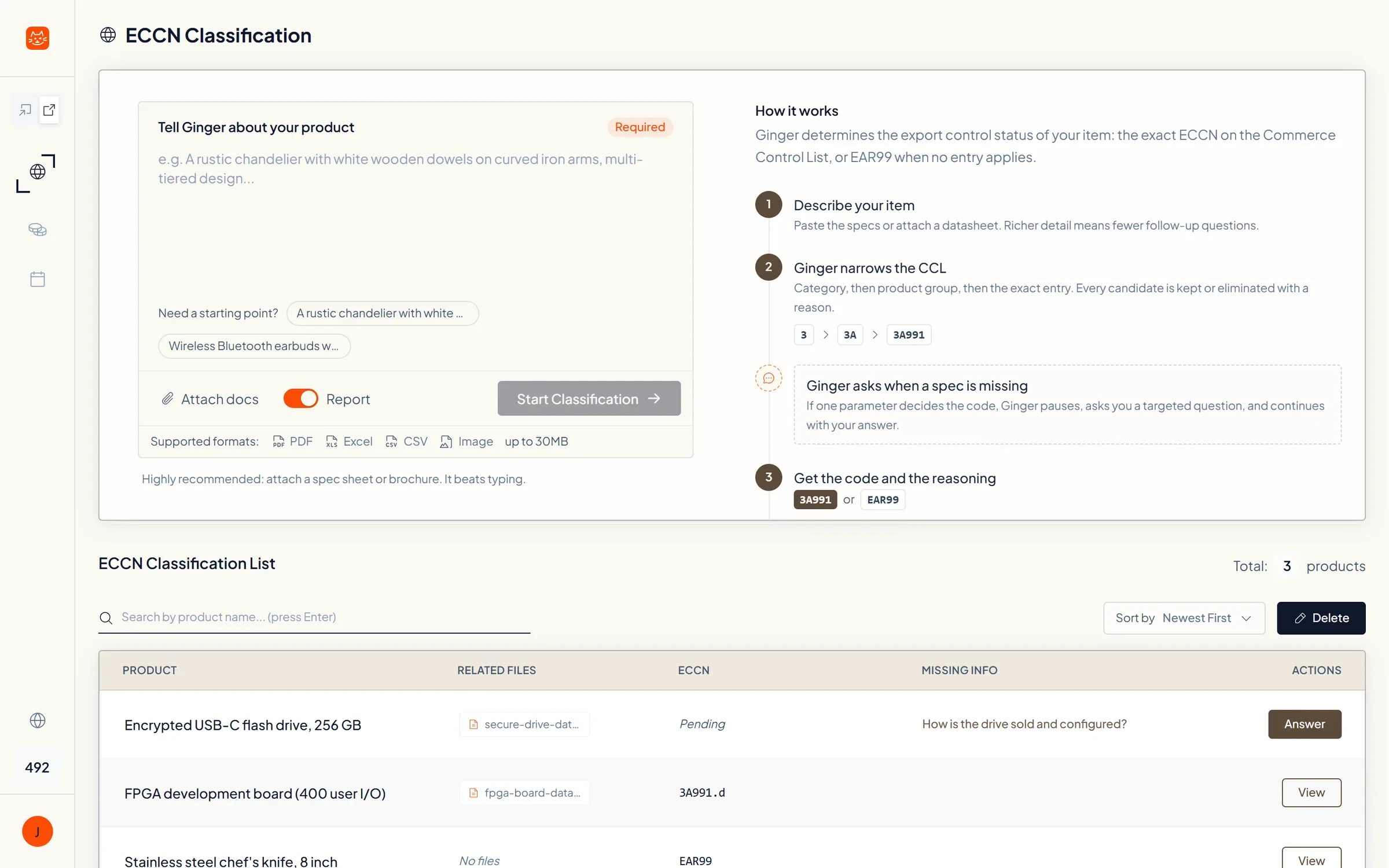
    Illustration with a sample item: the Tell Ginger about your product box holds a description of an FPGA development board and an attached datasheet PDF, with Attach docs and Start Classification buttons.

  2. Answer the one spec that decides it.

    When one parameter splits two entries and the documents don't state it, Ginger asks one multiple-choice question.

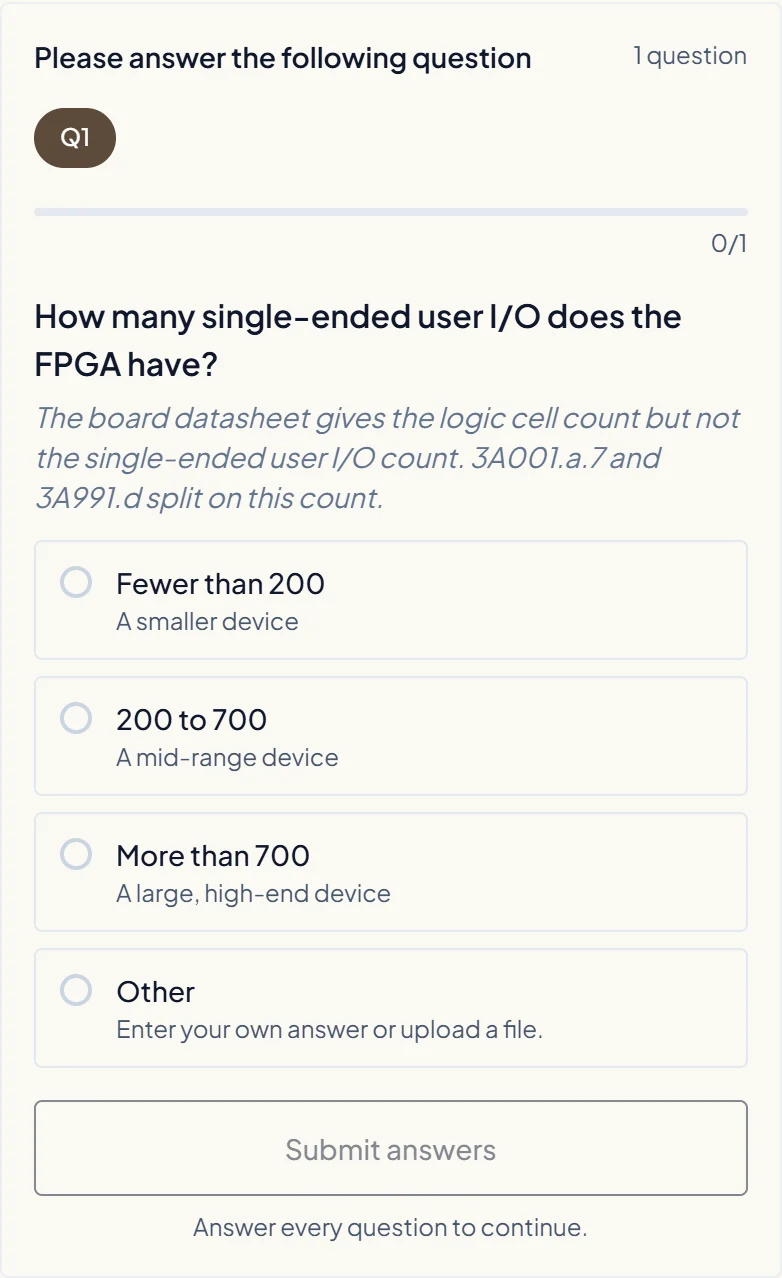
    Illustration with a sample item: Ginger asks one multiple-choice question, How many single-ended user I/O does the FPGA have?, noting that 3A001.a.7 and 3A991.d split on this count, with 200 to 700 selected. Above it, the User I/O row of Item Facts reads Not stated.

  3. Get the code and the reasoning.

    The ECCN, the item facts it relied on, and a report of every candidate it kept or eliminated.

    Illustration with a sample item: after the answer, the result shows the suggested ECCN 3A991.d marked Classification complete, with the attached datasheet and a Report button, and the User I/O row of the Item Facts table fills in as 400 single-ended I/O.

ECCN Classification
Tell Ginger about your productRequired

FPGA development board with a mid-range FPGA, USB-JTAG, Gigabit Ethernet and HDMI out. Datasheet attached.

fpga-board-datasheet.pdf
Attach docsStart Classification

Attach a spec sheet or datasheet. It beats typing.

  1. Describe the item.

    Type what it is and attach the datasheet. Richer detail means fewer follow-up questions.

    ECCN Classification
    Tell Ginger about your productRequired

    FPGA development board with a mid-range FPGA, USB-JTAG, Gigabit Ethernet and HDMI out. Datasheet attached.

    fpga-board-datasheet.pdf
    Attach docsStart Classification

    Attach a spec sheet or datasheet. It beats typing.

    Illustration with a sample item: the Tell Ginger about your product box holds a description of an FPGA development board and an attached datasheet PDF, with Attach docs and Start Classification buttons.

  2. Answer the one spec that decides it.

    When one parameter splits two entries and the documents don't state it, Ginger asks one multiple-choice question.

    ECCN Classification
    Item FactsUser I/ONot statedfpga-board-datasheet.pdf
    Please answer the following question1 question

    How many single-ended user I/O does the FPGA have?

    3A001.a.7 and 3A991.d split on this count.

    • Fewer than 200A smaller device
    • 200 to 700Its datasheet lists 400
    • More than 700A large, high-end device
    • OtherEnter your own answer or upload a file
    Submit answers

    Illustration with a sample item: Ginger asks one multiple-choice question, How many single-ended user I/O does the FPGA have?, noting that 3A001.a.7 and 3A991.d split on this count, with 200 to 700 selected. Above it, the User I/O row of Item Facts reads Not stated.

  3. Get the code and the reasoning.

    The ECCN, the item facts it relied on, and a report of every candidate it kept or eliminated.

    ECCN Classification
    Suggested ECCN3A991.dElectronic devices, and “components” not controlled by 3A001
    Classification completefpga-board-datasheet.pdfReport
    Item Facts
    ParameterValue
    ItemFPGA development board
    User I/O400 single-ended I/O
    Serial transceivers4 lanes at 6.6 Gb/s
    CryptographyNone for user data

    Illustration with a sample item: after the answer, the result shows the suggested ECCN 3A991.d marked Classification complete, with the attached datasheet and a Report button, and the User I/O row of the Item Facts table fills in as 400 single-ended I/O.

Will it ask if I'm hardware or software?

No. Ginger makes that call from the specs, then narrows the CCL to one entry with a reason for every candidate.

ECCN Classification
ECCN determination process
  1. 3
  2. 3A
  3. 3A991.d

Step 1Category 3: Electronics

The item is a circuit board whose function comes from a programmable logic device, which places it in Category 3.

CandidateDecisionReason
3KeptElectronic assembly whose function comes from a programmable logic device
4EliminatedNot a digital computer or computer unit offered as such
5A002EliminatedNo cryptographic function for data confidentiality

Step 2Product Group 3A: Systems, Equipment and Components

The item is physical hardware: a populated board with its components.

CandidateDecisionReason
3AKeptHardware: board and components
3BEliminatedNot test, inspection or production equipment
3DEliminatedDesign software is sold separately and is not part of this item

Step 3ECCN Entry 3A991.d: Electronic devices, and “components” not controlled by 3A001

3A001.a.7 controls field programmable logic devices with more than 700 single-ended I/O or an aggregate serial transceiver rate of 500 Gb/s or more. This device has 400 I/O and 26.4 Gb/s, so 3A991.d applies.

CandidateDecisionReason
3A991.dKept400 single-ended I/O, inside the 200 to 700 range
3A001.a.7EliminatedNeeds more than 700 I/O or 500 Gb/s aggregate; this device has 400 I/O and 26.4 Gb/s
EAR99EliminatedCovered by a CCL entry

Illustration with a sample item: the ECCN determination process narrows an FPGA development board from Category 3 to Product Group 3A to entry 3A991.d. Each step lists candidates marked Kept or Eliminated with a reason, such as 3A001.a.7, eliminated because the board has 400 I/O.

What does it look like in the app?

Real screens from the app, run on sample items.

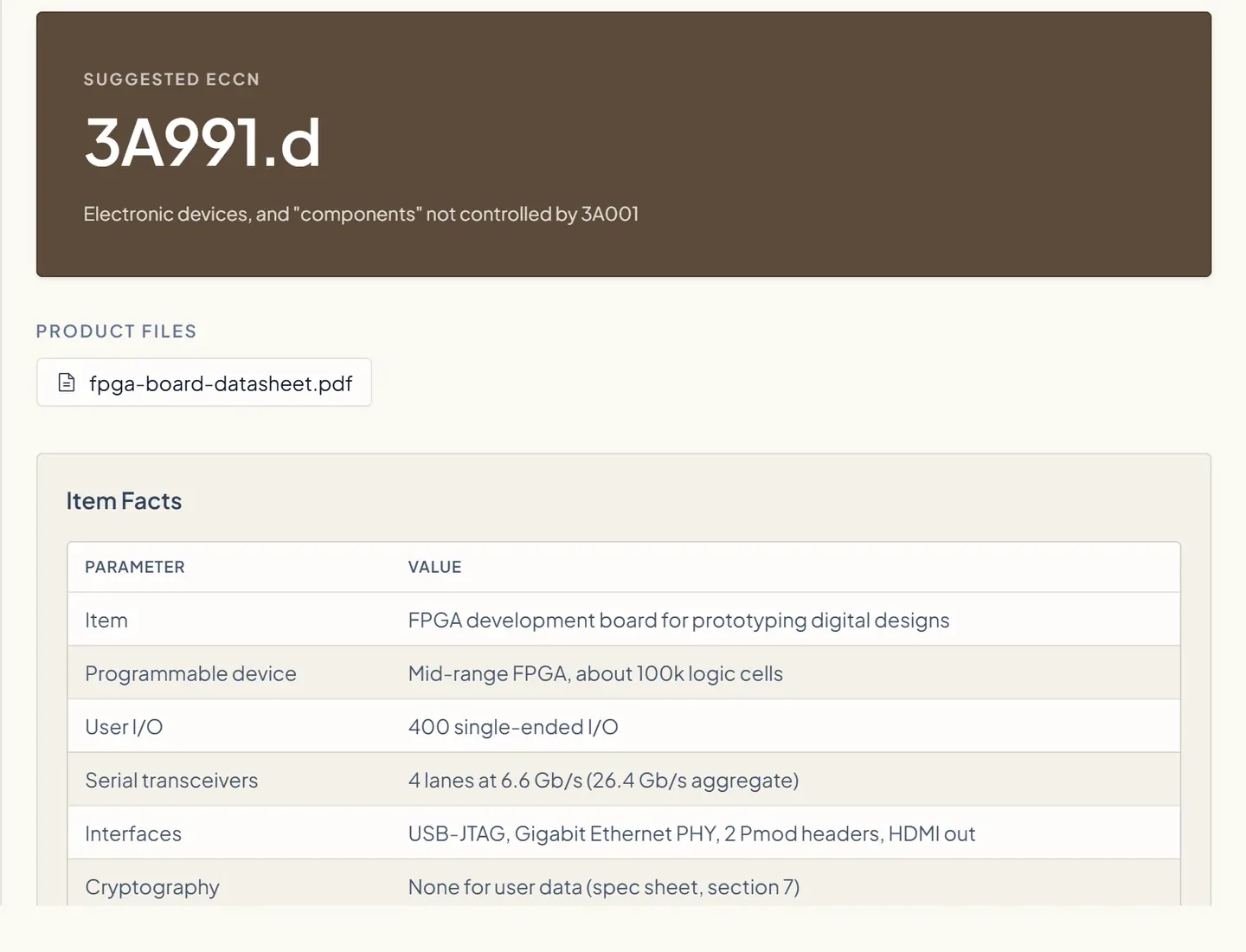
The Export Control Classifier result: suggested ECCN 3A991.d for an FPGA development board, the attached datasheet, and the item facts Ginger read from it

The suggested ECCN, with the item facts

The suggested ECCN next to the item facts Ginger read from your datasheet, so you can check each one.

Questions about the Export Control Classifier

How is ECCN classification software different from an ECCN lookup tool?

A lookup tool searches the Commerce Control List for the words you type and leaves the choice to you. The Export Control Classifier starts from your documents: it pulls the control parameters out of the datasheet, narrows the CCL from category to product group to entry, and records why each candidate was kept or eliminated. The result is research for your export compliance team or counsel to review, not legal advice.

How do I find the ECCN for my product?

First make sure it is not a defense article under ITAR, since the Export Control Classifier works under the EAR only. Then ask the manufacturer: many publish the ECCN of what they sell. If not, classify it yourself by matching the item's technical parameters against the Commerce Control List, category by category, which is the research the Export Control Classifier does from your datasheet. For a formal answer, BIS reviews classification requests under 15 CFR 748.3.

Is EAR99 an ECCN, and does an EAR99 item need a license?

EAR99 is not an ECCN. It is the designation for items subject to the EAR that are not listed on the Commerce Control List (15 CFR 734.3(c)), so not every product has an ECCN. Most EAR99 items ship without a license, but one is still needed for an embargoed destination or a prohibited end user or end use, such as a party on the Entity List.

How do I know if my item is EAR99?

By ruling out the Commerce Control List: an item subject to the EAR that matches no ECCN is EAR99. The trade.gov guide says EAR99 items generally consist of low-technology consumer goods, but you only know after checking the item's parameters against the CCL, which is the research the Export Control Classifier writes up.

What is the difference between an ECCN and an HTS code?

They answer different questions. An ECCN, from the Commerce Control List, says which export controls apply to an item; together with the destination, end user and end use, it decides whether an export needs a license. An HTS code, from the Harmonized Tariff Schedule, sets the duty on an import. A product usually has an HTS code and either an ECCN or EAR99, and the two are classified separately, by different rules. The export filing itself, the Electronic Export Information, reports a 10-digit Schedule B number, or in most cases the 10-digit HTS number in its place (15 CFR 30.6).

Do I need to know the CCL category before I start?

No. Tools that open with “Are you hardware or software?” hand the hardest call back to you, and one wrong answer sends the whole classification down the wrong branch. Ginger makes those calls from your specs and shows each one as a step in the determination process, so you can check it instead of guessing it.

What can I give it?

A written description, or files: PDF spec sheets, datasheets and firmware documentation, Excel or CSV sheets, and images, up to 30 MB. A datasheet usually beats typing, because the parameters an ECCN turns on, such as I/O counts or data rates, are usually in it.

When does it ask me a question?

Only when one parameter decides between two branches and your documents don't state it, such as an FPGA's I/O count sitting between 3A001.a.7 and 3A991.d. Ginger pauses, asks one targeted multiple-choice question, and continues with your answer. If the datasheet already answers it, you won't be asked.

Does it cover ITAR and the USML?

Not today. The Export Control Classifier works under the EAR and searches the Commerce Control List. ITAR and USML jurisdiction work is on the roadmap, not in the product, so anything that may be a defense article should go to your export counsel.

Does it tell me whether I need an export license?

No. It stops at the classification. License determination, license exception analysis and denied-party screening are on the roadmap, not live today. Your export compliance team takes the ECCN from there, with the destination, end user and end use in hand.

Does it produce audit-ready documentation?

Yes. Every run ends in an ECCN Classification Report: the item facts, which facts were verified against your documents and which were not, the decision, every candidate kept or eliminated with its reason, the sources and research queries, and your conversation with Ginger. The EAR asks exporters to keep export records for five years (15 CFR Part 762), and the report is built to sit in that file.

Is the Export Control Classifier available via API?

Not currently. It runs as an interactive workflow in the GingerControl web app: you upload the documents, answer a question when they can't settle a branch, and get the report online.

Want an AI system that fits your process?

See GingerOS.

GingerOS is the trade compliance system we build on your own process: every code keeps its reason, and every change in your company triggers its own compliance recheck (tariffs, classification, export controls and more).

Click Me!

See how GingerOS works