Product

Product Sandbox, N x M Tariff Matrix for Product-Line Decisions

Stop maintaining a multi-tab Excel of HTS codes, countries, and landed costs. Product Sandbox is a single canvas where you compare N products against M sourcing countries, see the lowest landed cost highlighted automatically, quantify FTA savings, sanity-check valuation against USITC AUV benchmarks, and keep a complete Selection History for CF 28 audit response.

How It Works

01

Import Your Products

Add products one at a time or bulk import an Excel / CSV catalog. Sandbox accepts HTS candidates from your prior Classifier research, manual entry, or batch upload. Pending Tariff Badges in the Classifier surface products that are ready for matrix analysis.

02

Configure the Matrix

Set shipment value, entry date, freight terms, Section 232 inputs, and your favorite source countries once, then apply them to every product in the workspace. The world map shades countries by FTA status so you can pick sourcing alternatives visually.

03

Compare, Drill Down, and Save

The N x M matrix highlights the lowest landed cost in each row and the global optimum across the workspace. Click any cell to expand the full duty stack, open the FTA Compare Drawer, or run the Valuation Sanity Check. Every saved configuration is written to Selection History with timestamps for downstream audit response.

See It In Action

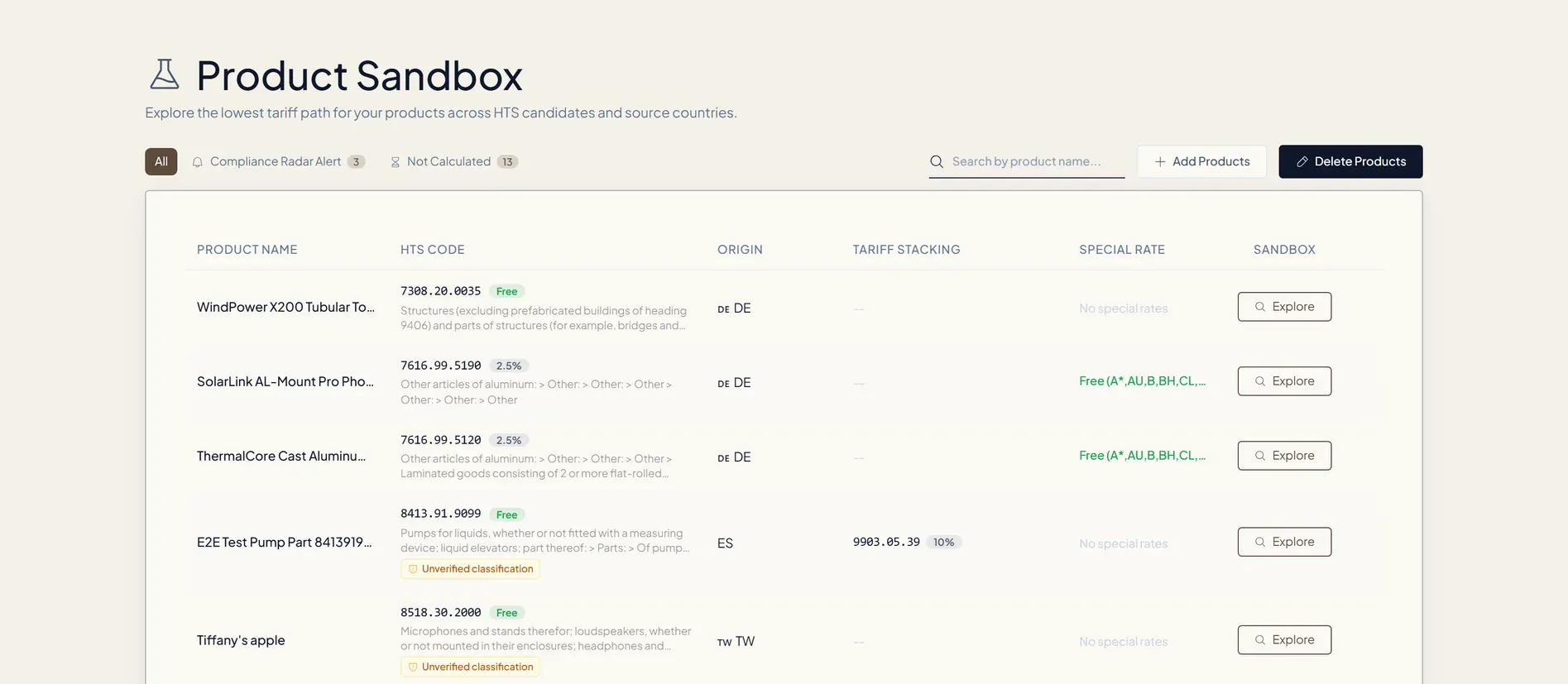
Product Sandbox per-product tariff matrix showing GoldenCane Raw Cane Sugar landed cost across Brazil, China, and Thailand with row-best and global-best cells highlighted in green

01 / Per-Product View

One Matrix, Every Country, Every HTS Candidate

A single N x M grid shows landed cost for each product across every selected country, with row-best and global-best cells highlighted in green. Stop comparing five browser tabs of the USITC HTS lookup, the numbers are right here, recalculated against today's tariff schedules including Section 301, 232, 122, and Chapter 99.

02 / Workspace

Workspace Overview, Every SKU in One Frame

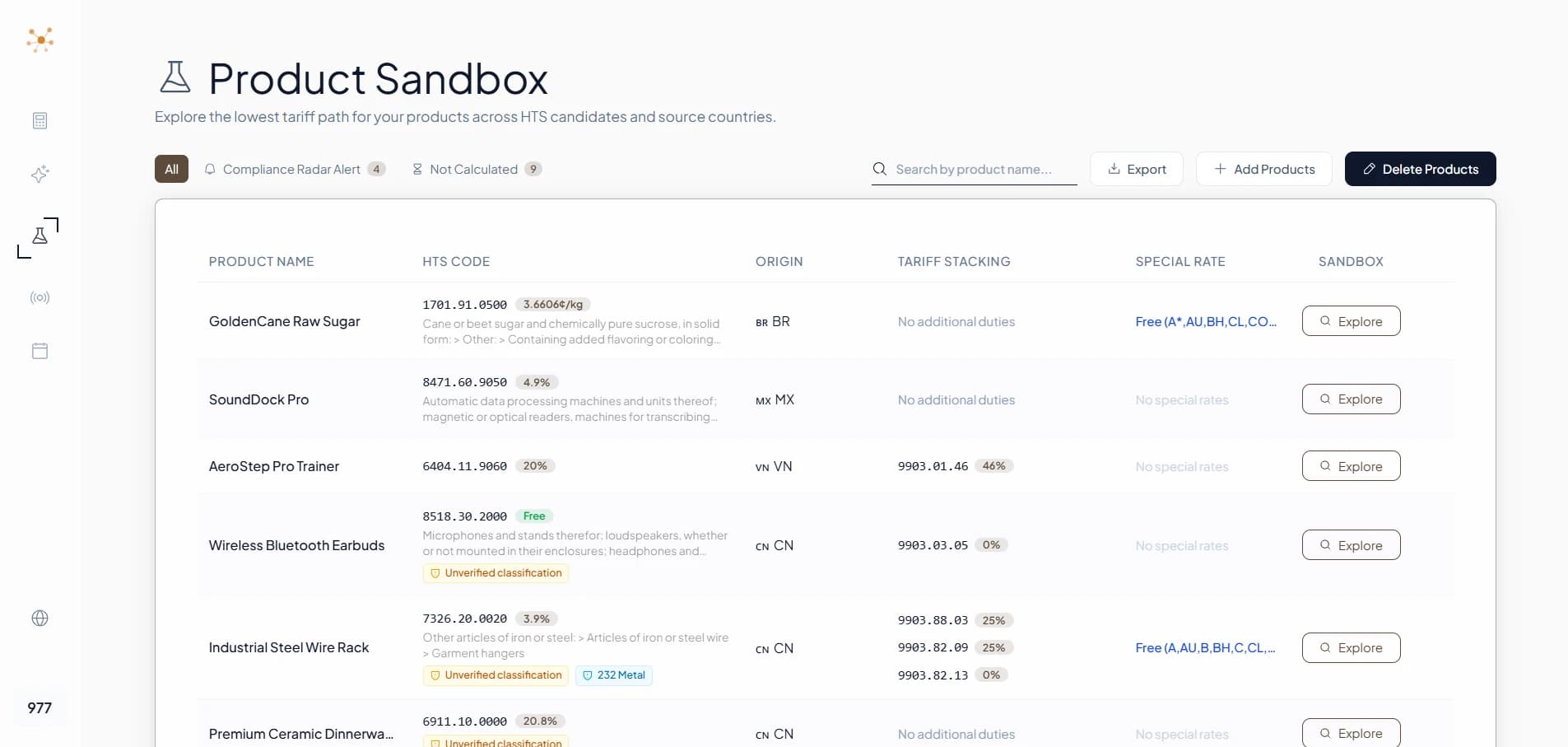
The Sandbox workspace lists every product you have under analysis on one page. The Compliance Radar Alert tab surfaces SKUs that need re-evaluation after a policy change, the Not Calculated tab catches anything still missing a configuration, and the Special Rate column previews FTA eligibility before you even open the matrix. Bulk select, export, or jump straight into the per-product matrix with one click.

Product Sandbox workspace overview listing six products (GoldenCane Raw Cane Sugar, SoundDock Pro, AeroStep Pro Trainer, Wireless Bluetooth Earbuds, Industrial Steel Wire Rack, Premium Ceramic Dinnerware) with HTS code, origin, tariff stacking, special rate, and Explore actions
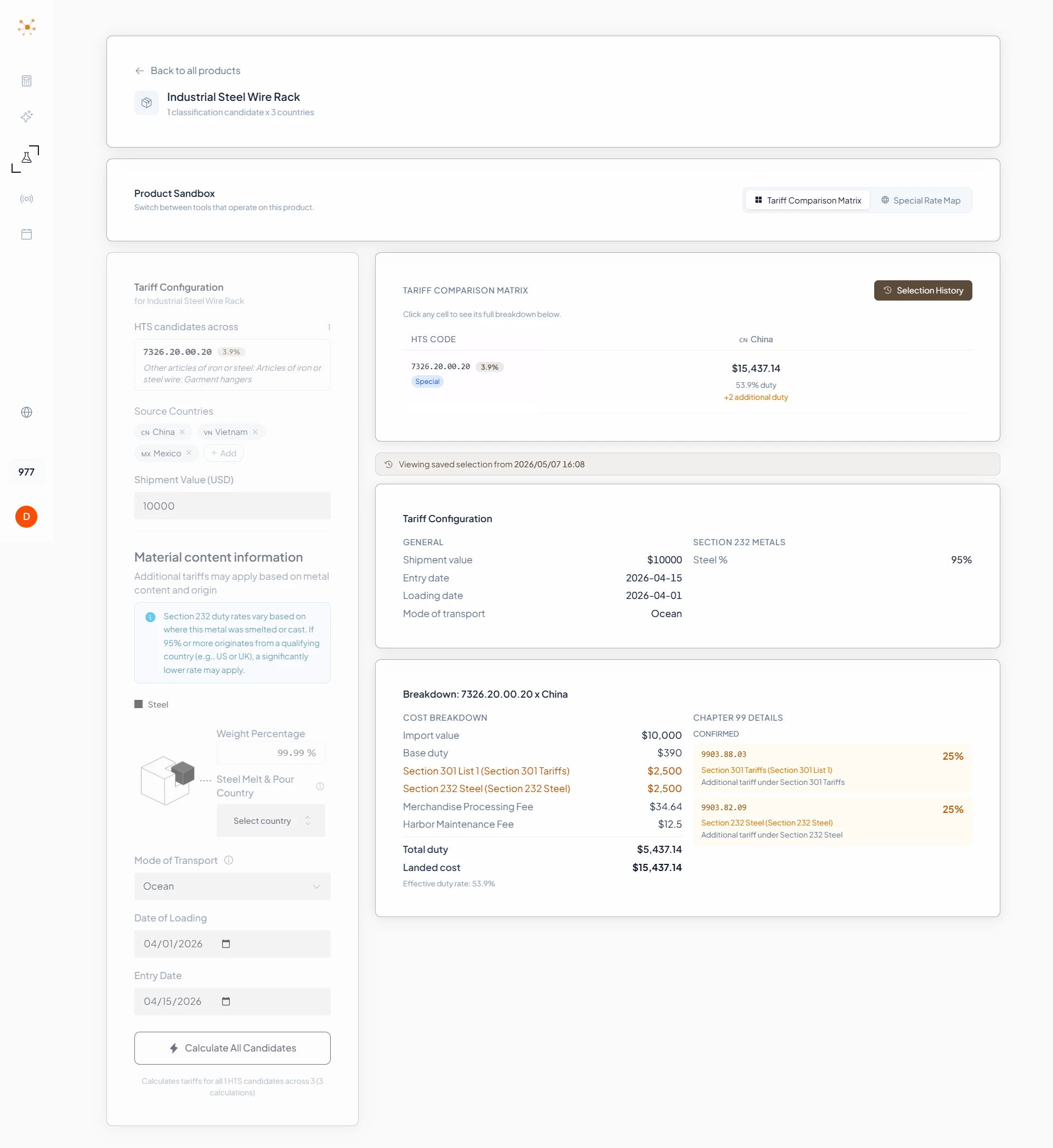
Sandbox Selection History view for Industrial Steel Wire Rack restoring a saved configuration from 2026-05-07 with full duty breakdown including Section 301 25 percent and Section 232 25 percent Chapter 99 surcharges

03 / Audit Trail

Selection History, CF 28 Ready

Every time you commit a sourcing decision, Sandbox writes the HTS candidate, country, configuration, and tariff stack to Selection History with a timestamp. When CBP sends a CF 28 inquiry, you have a complete record of why a specific HTS / origin combination was chosen on a specific date, the same evidence trail customs brokers build manually.

04 / FTA Savings

FTA Compare Drawer + Special Rate Map

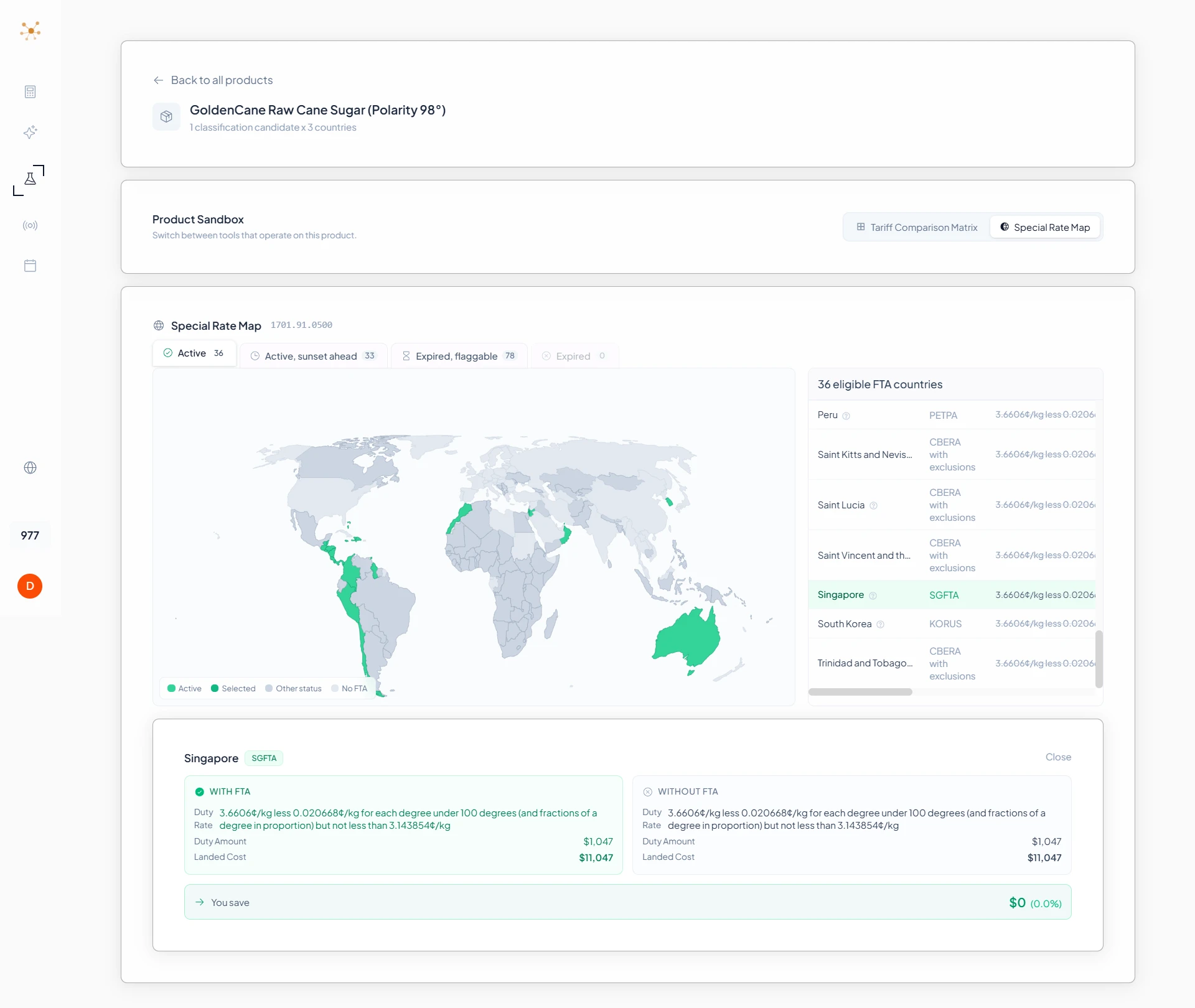
Pulling a USMCA, KORUS, or CAFTA-DR claim is worth nothing if you cannot quantify the savings versus the MFN rate. The FTA Compare Drawer shows the exact dollar delta side by side. The Special Rate Map color-codes every country by Active / Expired / Pending FTA status so you stop relying on a stale internal spreadsheet.

Sandbox Special Rate Map showing 36 FTA-eligible countries on a world map with Singapore selected and the FTA Compare Drawer comparing WITH FTA versus WITHOUT FTA duty and landed cost

Key Features

Decide

The decision surface where you compare every product against every country in one canvas.

N x M Tariff Matrix

Every product (rows) against every selected source country (columns) in one view. Row-best and global-best cells are highlighted automatically. Click any cell to expand the full duty stack: MFN base rate, Section 301, Section 232, Section 122, Chapter 99 surcharges, MPF, and HMF.

FTA Compare Drawer

Quantifies the actual dollar savings of using a Free Trade Agreement preference (USMCA, KORUS, CAFTA-DR, Israel FTA, and others) versus the MFN rate. Stop guessing whether the certificate-of-origin paperwork is worth the effort, the drawer tells you exactly how much you save per shipment.

Defend

Catch valuation risk before CBP does and keep a record of every classification you committed to.

Valuation Sanity Check (USITC AUV)

Sandbox cross-references your declared value against USITC Dataweb Average Unit Value benchmarks for the same HTS line. When your declared value drifts below AUV by an unsafe margin, you get a flag before CBP does, preventing the kind of undervaluation challenges that lead to entry rejection or surety bond increases.

Selection History (Audit Trail)

Every committed selection writes the HTS, country, configuration, and full tariff calculation to a timestamped history. 19 CFR 163.4 requires importers to retain classification records for five years. Selection History is built so CF 28 responses become a copy-paste exercise instead of a forensic project.

Scale

From a single SKU to a thousand-product catalog, without losing the audit trail.

Bulk Import + World Map Country Picker

Upload an Excel or CSV of up to thousands of SKUs in one shot. Use the interactive world map to add source countries by region, with countries shaded by FTA status (Active / Expired / Pending). Save favorite country sets so you never reselect the same group twice.

Cross-Product Integration

Sandbox is wired into the rest of GingerControl: Pending Tariff Badges from the HTS Classifier surface products ready for matrix analysis, and the Compliance Radar Alert tab inside Sandbox lists exactly which products need re-evaluation when a new policy lands.

Who Uses This

Product Sandbox is built for teams that own product-line sourcing decisions and need a defensible record of why each choice was made.

Supply Chain Managers

Compare landed cost across alternative source countries before reshuffling suppliers

Sourcing Teams

Quantify the dollar impact of moving SKUs from one origin to another

Product Line PMs

Build board-ready sourcing recommendations with documented assumptions

Compliance Managers

Maintain a CF 28-ready audit trail of every classification and country selection

CFO / Finance

Model duty cost scenarios across multiple sourcing strategies for budget planning

Customs Brokers

Run pre-entry valuation and FTA eligibility checks for client portfolios in one workspace

The Job To Be Done

"When a new Section 301 list lands on a Friday afternoon, I need to know by Monday morning which of my SKUs are affected, what each one will cost to land if I shift sourcing to an alternate country, whether I can claim FTA preference on the new origin, and whether my declared values still survive a CBP valuation challenge. And eighteen months from now, when the CF 28 inquiry shows up, I need a defensible record of why I chose what I chose."
The workflow that Product Sandbox is built around

How Sandbox Carries That Job

Find affected SKUs across the catalog in minutes, not days

The N x M matrix loads every product against every selected country at once. The cells highlight green where landed cost is lowest, red where surcharges spike. You see the shape of the impact at a glance, then drill in.

Quantify the dollar delta of switching origins before recommending a move

Click any matrix cell to expand the full duty stack: MFN base, Section 301, 232, 122, Chapter 99, plus MPF and HMF. The FTA Compare Drawer puts MFN and the FTA-preference rate side by side with the exact dollar savings per shipment.

Catch undervaluation risk before CBP catches it

Valuation Sanity Check cross-references your declared value against USITC AUV benchmarks for the same HTS line. When declared value drifts below AUV by an unsafe margin, the flag fires in Sandbox, not at the port.

Defend the decision eighteen months later

Every committed selection writes to Selection History with a timestamp, the HTS candidate used, the configuration applied, and the tariff stack at the time. 19 CFR 163.4 wants five years of classification records. Sandbox gives you that record without an Excel time machine.

Frequently Asked Questions

How is Product Sandbox different from a tariff calculator?

+
A tariff calculator answers 'what is the duty on this one HTS code from this one country.' Product Sandbox answers 'across these N products and M source countries, which combinations give me the lowest landed cost, where does FTA preference apply, where is my declared value risky, and what is the audit trail for the decision I just made.' It is a product-line decision canvas, not a single-line calculator.

What is Selection History and why does it matter for CF 28?

+
Selection History is a timestamped record of every committed product-country-configuration combination, including the HTS candidate used, the duty stack at the time, and the conditions you applied. 19 CFR 163.4 requires importers to retain classification records for five years. When CBP sends a CF 28 inquiry, Selection History is the evidence you would otherwise have to reconstruct from emails, spreadsheets, and tribal knowledge.

How does the Valuation Sanity Check work?

+
USITC Dataweb publishes Average Unit Value (AUV) statistics for every HTS line based on actual import filings. Sandbox cross-references your declared shipment value against AUV for the same HTS. When your declared value drifts below AUV by an unsafe margin, you get a flag before CBP does. This is the same benchmark customs auditors use when challenging undervaluation.

Does Sandbox integrate with the HTS Classifier?

+
Yes. Products you research in the HTS Classifier carry their candidate codes directly into Sandbox via Pending Tariff Badges. When the Compliance Radar surfaces a policy change, the Sandbox 'Radar Alert' tab lists exactly which of your products need to be re-evaluated, and a single click jumps you back into the Classifier or the Sandbox cell for that product.

Can I bulk import an existing product catalog?

+
Yes. Bulk Import accepts Excel and CSV files. You can upload thousands of SKUs in one shot. Sandbox parses the HTS codes, applies your saved configuration template (countries, shipment value, dates), and renders the full matrix without you keying products in one by one.

Start Mapping Your Product-Line Decisions

Open the Sandbox and build your first N x M matrix in minutes. Selection History captures every decision for audit response.

For general reference only. See compliance disclaimer.

Compliance Reminder

This is an HTS classification researcher. Results are for general reference, educational, and planning purposes only, designed to enable better communication between trade compliance teams, importers, and licensed customs brokers. Per CBP Ruling HQ H290535, providing HTS classifications beyond 6 digits for specific imports constitutes "customs business" under 19 U.S.C. § 1641. Do not use these results directly in customs entry documents without independent review by a licensed customs broker.

Read full compliance disclaimer

We use cookies to understand how visitors interact with our site. No personal data is shared with advertisers.