Product

Coming Soon, Launching 2026-05

Compliance Radar, Personalized Trade Policy Alerts

Federal Register email floods your inbox with 20 policy notices a day and 90 percent of them have nothing to do with your products. Compliance Radar fixes that. We track CSMS, the Federal Register, the White House, CBP Rulings, and USTR notices, then cross-reference every new action against your Classifier and Sandbox records so you only see alerts that affect your actual SKUs. Each alert lists the exact products impacted and links you straight to the right Classifier or Sandbox screen to reclassify or recalculate.

GingerControl Compliance Radar showing a CSMS ImpactAlertCard for a Section 232 aluminum surcharge change with three affected products listed

How It Works

01

Radar Tracks Five Authoritative Sources

Radar continuously ingests CSMS (CBP cargo system messages), the Federal Register, White House proclamations and executive orders, CBP Rulings (HQ and NY ruling letters), and USTR notices (Section 301, FTA actions). Each source carries a color-coded SourceBadge so you can instantly tell where an alert came from and how authoritative it is.

02

Personalized Matching to Your Products

Every new policy action is matched against your Classifier research and Sandbox records. Instead of a generic 'Section 232 modified' headline, you get 'Affects 3 of your products: Aluminum Foil Laminate 7607.20.50.00, Aluminum Stand-up Pouch 7607.19.60.00, Aluminum Closure Cap 8309.90.00.00.' No more cross-referencing notices against an internal SKU list by hand.

03

Action Alerts with Reclassify / Recalculate Buttons

Each ImpactAlertCard ships with the two buttons that matter: Reclassify (jumps to the HTS Classifier with the affected product loaded) and Recalculate (jumps to Product Sandbox with the new tariff stack applied). Email and Google Calendar Connectors deliver alerts and effective dates to wherever your team already lives.

See It In Action

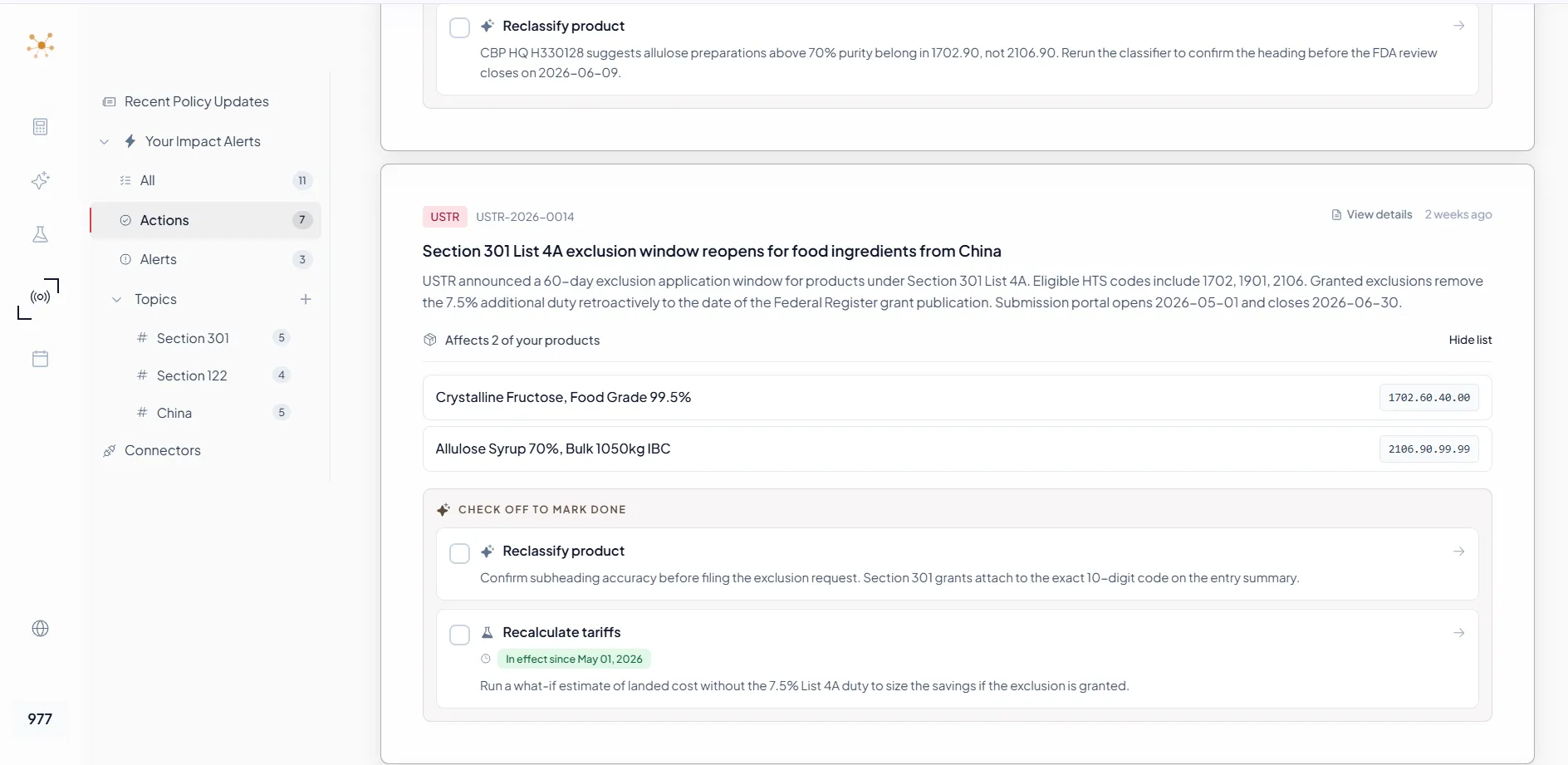
Compliance Radar ImpactAlertCard for USTR Section 301 List 4A exclusion window with two affected products (Crystalline Fructose 1702.60.40.00 and Allulose Syrup 2106.90.99.99) and Reclassify and Recalculate action checkboxes

01 / Core Unit

ImpactAlertCard, the Core Unit of Radar

The ImpactAlertCard is what makes Radar different from a policy newsletter. It surfaces the source (CSMS, Federal Register, White House, CBP, USTR), summarizes the change, lists exactly which of your products are affected with their HTS codes, and provides one-click Reclassify and Recalculate actions wired into the Classifier and Sandbox.

02 / Search + Audit

Quick Check + a Defensible Audit Trail

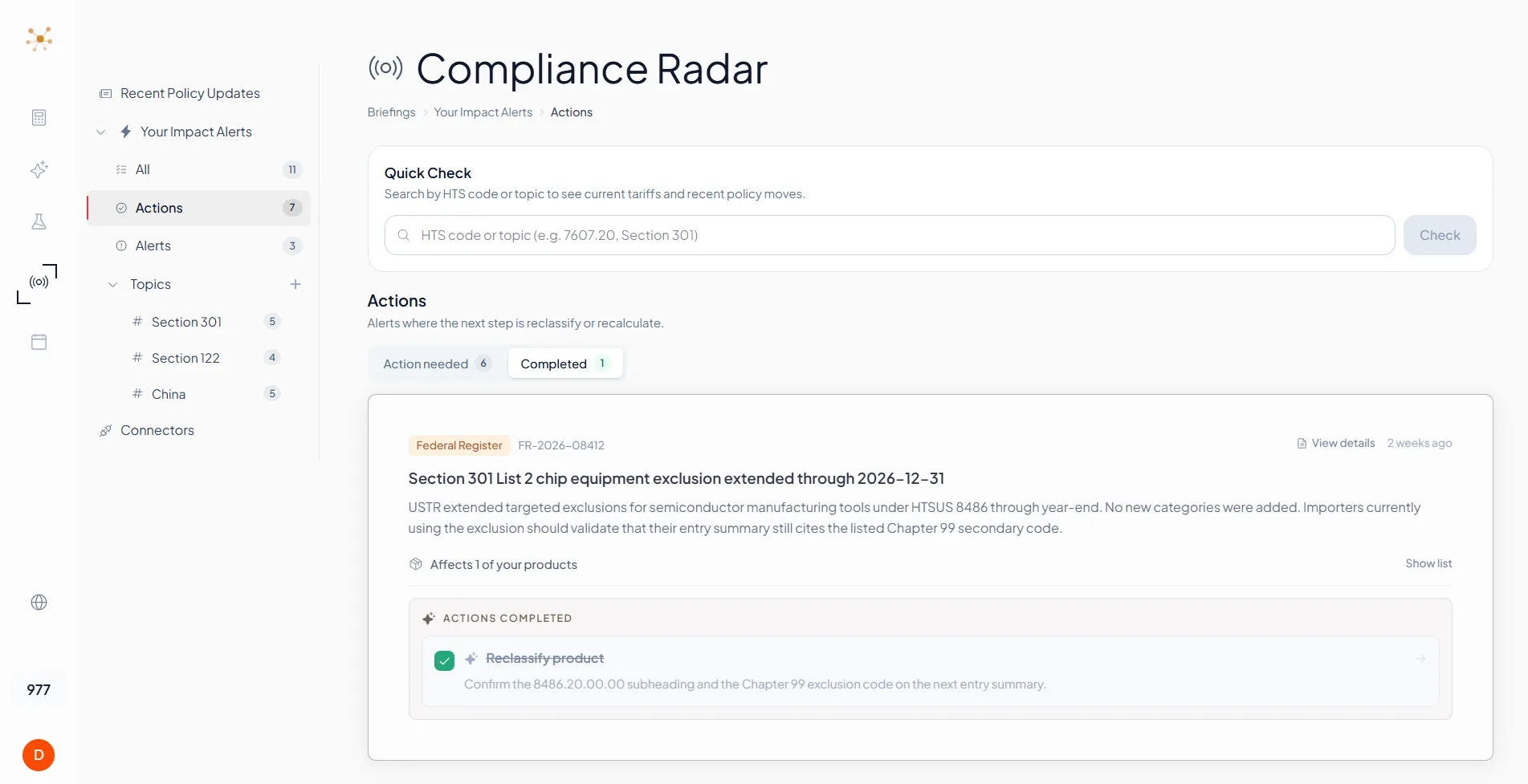
Quick Check sits at the top of the Actions view so any HTS code or topic question is one search away. Below, the Action needed / Completed split tracks the lifecycle of every alert. Once you check off a Reclassify or Recalculate task, the alert moves to Completed with the reasoning preserved, so you have a clean record of how each policy change was handled.

Compliance Radar Quick Check search bar above the Action needed and Completed tabs, with a completed Federal Register alert showing a struck-through Reclassify product task confirming the 8486.20.00.00 subheading and Chapter 99 exclusion code
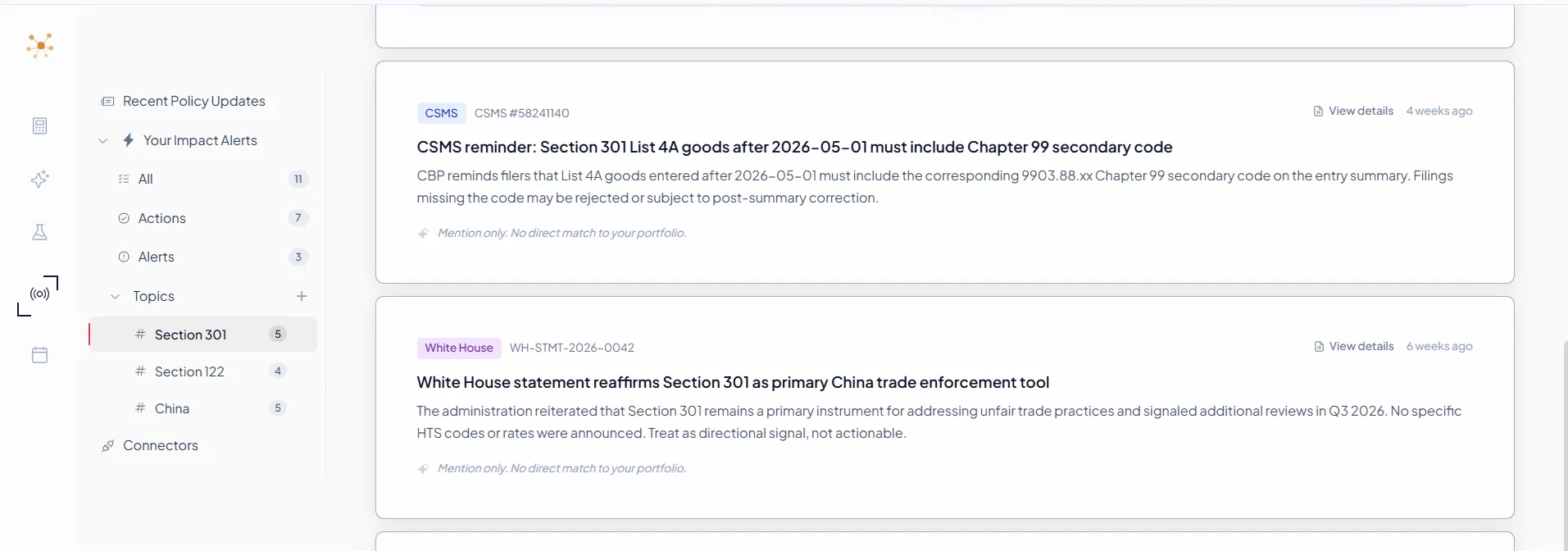
Compliance Radar Topics sidebar showing Section 301 (5 alerts), Section 122 (4), and China (5) subscriptions, with a CSMS reminder and a White House statement both filtered to the Section 301 topic

03 / Subscriptions

Topic Subscriptions That Actually Match Your Work

Subscribe to topics like Section 301, China, Aluminum, or Sugar and Radar threads new policy actions back to those topics automatically. The topic sidebar tracks counts per subscription so you immediately see where activity is heating up. Items that are directionally relevant but not tied to your portfolio show up as 'Mention only' so you can scan signal without acting on noise.

Key Features

Detect

Catch the signal that matters to your portfolio. Filter out everything else.

Personalized Impact Alerts

Radar matches every new policy action against your Classifier and Sandbox records. The ImpactAlertCard tells you 'Affects N of your products' with the exact HTS list, not a generic newsletter blast. No more reading 20 notices a day to find the 2 that matter.

Five-Source Coverage

CSMS, Federal Register, White House, CBP Rulings, USTR. Every alert carries a color-coded source badge (CSMS blue, FR amber, WH purple, CBP green, USTR rose) so you instantly see how authoritative the signal is and how soon it will affect entries.

Topic Subscriptions and Research View

Subscribe to topics like Section 301, China, Aluminum, or specific HTS chapters and Radar threads new actions back to those topics automatically. The TopicResearchView synthesizes an AI summary with cited sources so you can brief your team without leaving Radar.

Search

Ask anything, get a synthesized answer pulled from every authoritative source.

Pulse Check On-Demand Search

Type any HTS code or free-text question into the Pulse Check Bar and Radar returns a single result card summarizing the current policy landscape, including which lists, surcharges, and exclusions apply right now. Built for the moment a sourcing or compliance question lands on your desk and you need an answer before the meeting.

Quick Check Cross-Source Live Search

Quick Check goes beyond on-site search to live cross-source retrieval, querying CSMS, Federal Register, White House, USTR, and CBP Rulings simultaneously and synthesizing a single integrated answer for any topic or HTS code. Built for the moment a sourcing question needs an answer pulled from every authoritative source at once.

Resolve

Convert policy signal into completed tasks, delivered to where your team actually works.

One-Click Reclassify and Recalculate

Alerts are not just news, they are tasks. Each ImpactAlertCard includes Reclassify (jumps to the HTS Classifier with the affected product loaded) and Recalculate (jumps to Product Sandbox with the updated tariff stack). Mark actions complete and the alert moves to the Completed tab, giving you a clean audit trail of how each policy change was handled.

Auto Reclassify and Recalculate on Effective Date

When a policy takes effect, Radar automatically reclassifies and recalculates duties for every affected product in your records, with a full change-log so CF 28 evidence is preserved. No more 'oops, we missed the May 1 effective date.'

Email and Google Calendar Connectors

Push alerts to your inbox in digest form and write policy effective dates straight to your Google Calendar so deadlines stop slipping. Built for the reality that compliance teams live in email and calendars, not in another dashboard.

The Three-Way Closed Loop (Market First)

No other policy tool ties alerts to your own classification records and your own sourcing decisions. Radar closes the loop between Classifier, Radar, and Sandbox.

NodeWhat Happens
HTS ClassifierYou classify your products. The reasoning chain and selected HTS candidates are stored in your account.
Compliance RadarWhen a new policy lands, Radar matches it against your stored classifications and produces an ImpactAlertCard listing exactly which products are affected.
Product SandboxThe Recalculate action jumps to Sandbox with the impacted products preloaded into the Radar Alert tab. You re-run the matrix, commit a new Selection, and the alert is marked done.

Where the Loop Shows Up In Product

Radar Alert tabs are wired into both the Classifier and the Sandbox, so a policy change does not stop at a notification, it lands as a task in the surface where you actually do the work.

Inside HTS Classifier

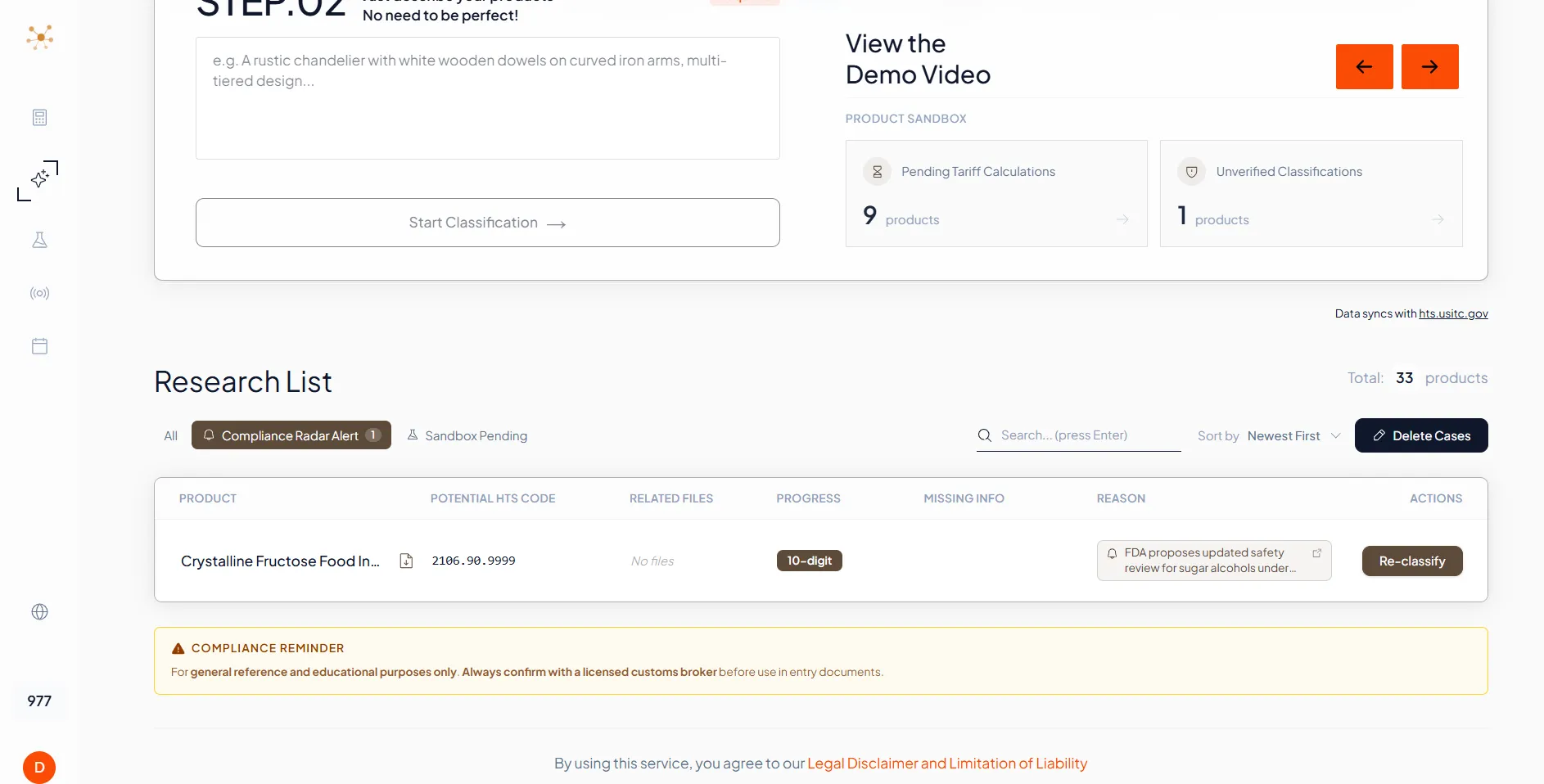
Compliance Radar Alert tab inside the HTS Classifier Research List showing Crystalline Fructose Food Industrial product flagged for re-classification with an FDA safety review reason and a Re-classify button
The Compliance Radar Alert tab in the Classifier Research List surfaces products flagged by policy changes, with a Re-classify button that reopens the GRI reasoning workflow for that exact SKU.

Inside Product Sandbox

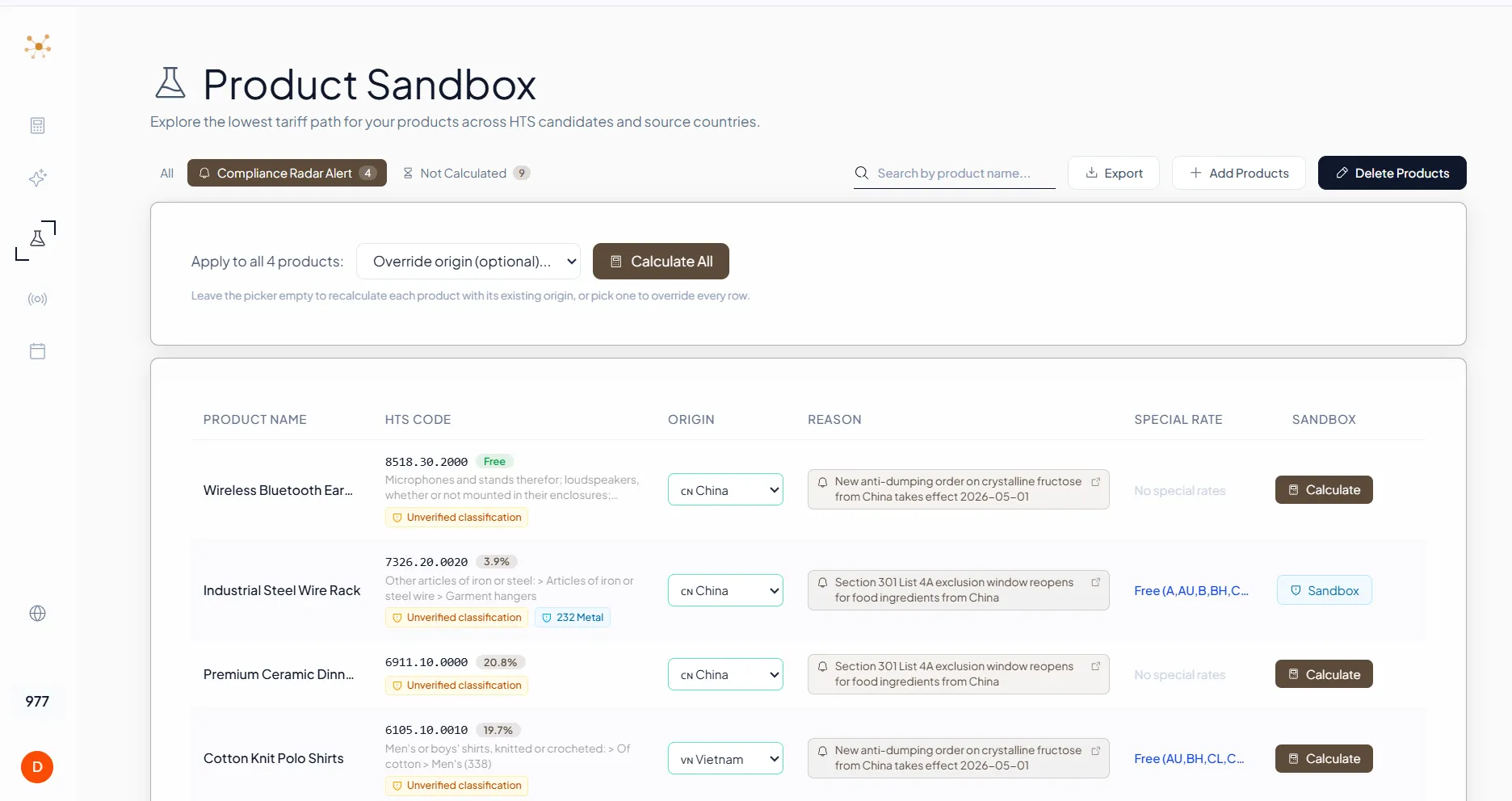
Compliance Radar Alert tab inside Product Sandbox listing four affected products (Wireless Bluetooth Earbuds, Industrial Steel Wire Rack, Premium Ceramic Dinnerware, Cotton Knit Polo Shirts) with per-row reason badges and a bulk Calculate All control
The Compliance Radar Alert tab in Sandbox lists every product impacted by a policy change with its HTS, current origin, reason badge, and a Calculate button. Bulk Calculate All re-runs the matrix across the entire alert set in one click.

Who Uses This

Compliance Radar is the noun-type subscription compliance teams check every morning. Built for the people who own the question 'did anything change overnight that breaks our entries today.'

Compliance Managers

Replace daily Federal Register / CSMS triage with personalized alerts tied to actual SKUs

Sourcing Teams

Catch tariff list changes that affect supplier countries before they hit the entry

Customs Brokers

Brief clients on policy actions with a pre-built list of which of their products are impacted

Trade Lawyers

Track rulemaking from White House announcement through Federal Register final rule with full source-of-record links

Supply Chain Managers

Get policy effective dates written into Google Calendar so reshuffles are timed correctly

CFO / Finance

Receive an Email digest of policy actions that affect duty cost forecasts, without joining another dashboard

Frequently Asked Questions

How is this different from Federal Register or CSMS email subscriptions?

+
Federal Register email and CSMS notifications are raw feeds. They send everything, with no filtering for what is actually relevant to your products. You still have to read each notice, cross-reference it against your internal SKU list, and translate it into 'which of my products need to be reclassified or recalculated.' Compliance Radar does that translation for you. The ImpactAlertCard arrives already personalized to your Classifier and Sandbox records, with Reclassify and Recalculate buttons wired up.

How does Radar match policy actions to my products?

+
Radar reads your stored Classifier research and Sandbox configurations to know which HTS chapters, headings, and source countries you actually deal with. When a new CSMS message, Federal Register notice, or USTR action publishes, Radar parses the affected HTS ranges and source countries from the policy text and intersects them with your portfolio. Only the actions that affect your real SKUs surface as ImpactAlerts.

Which sources does Radar track?

+
Five primary sources: CSMS (CBP cargo system messages, the most operationally immediate), the Federal Register (final publication of all federal rules), the White House (proclamations and executive orders, the earliest signal), CBP Rulings (HQ and NY ruling letters), and USTR notices (Section 301, FTA, and trade remedy actions). Each source carries a distinct SourceBadge color so you can immediately gauge how authoritative and how soon-to-take-effect a signal is.

How are alerts delivered?

+
Inside Radar as ImpactAlertCards, by Email digest via the Email Connector (designed for team members who do not live in the dashboard), and by Google Calendar entry via the Calendar Connector (policy effective dates write directly to your calendar so deadlines stop slipping). You choose which channels each topic uses.

Does Radar work standalone if I am not using HTS Classifier or Sandbox yet?

+
Yes. You can subscribe to topics (Section 301, China, Aluminum, specific HTS chapters) and run on-demand Pulse Check queries even without stored classifications. But the personalized 'Affects N of your products' magic only works once you have done some classification or matrix work, because that is what Radar matches against. Most teams adopt Radar alongside the Classifier or after they have built a Sandbox workspace.

Get Notified When Radar Launches

Compliance Radar launches in 2026-05 (tentative). Talk to us if you want early access or want Radar tuned to a specific portfolio at launch.

For general reference only. See compliance disclaimer.

Compliance Reminder

This is an HTS classification researcher. Results are for general reference, educational, and planning purposes only, designed to enable better communication between trade compliance teams, importers, and licensed customs brokers. Per CBP Ruling HQ H290535, providing HTS classifications beyond 6 digits for specific imports constitutes "customs business" under 19 U.S.C. § 1641. Do not use these results directly in customs entry documents without independent review by a licensed customs broker.

Read full compliance disclaimer

We use cookies to understand how visitors interact with our site. No personal data is shared with advertisers.